Get a FREE marketing audit and discover what's holding your practice back from reaching its full potential.
Picture a patient trying to book an appointment on your website. She has low vision and uses software that reads web pages aloud. The software reaches your booking button and says only "button." It reaches your intake form, and none of the fields have labels. After a few minutes, she gives up and calls a different practice. You never hear about it. There's no complaint and no bad review, just an empty appointment slot and a patient who went somewhere else.
This happens more often than most practices realize. More than 1 in 4 U.S. adults live with some type of disability, according to the Centers for Disease Control and Prevention. That's why medical website accessibility has moved from a nice-to-have to a federal requirement for many healthcare organizations. This guide explains what's changing, what the rules say, and what you can do.
Website accessibility means that people with disabilities can use your website as easily as anyone else. That includes people who are blind or have low vision, people who are deaf or hard of hearing, people with limited use of their hands, and people with cognitive or learning disabilities.
The CDC's data show how common these disabilities are: cognitive disabilities affect 13.9% of U.S. adults, mobility 12.2%, hearing 6.2%, and vision 5.5%. In a healthcare setting, those numbers are likely higher because the people who need care most often are also the people most likely to live with a disability.
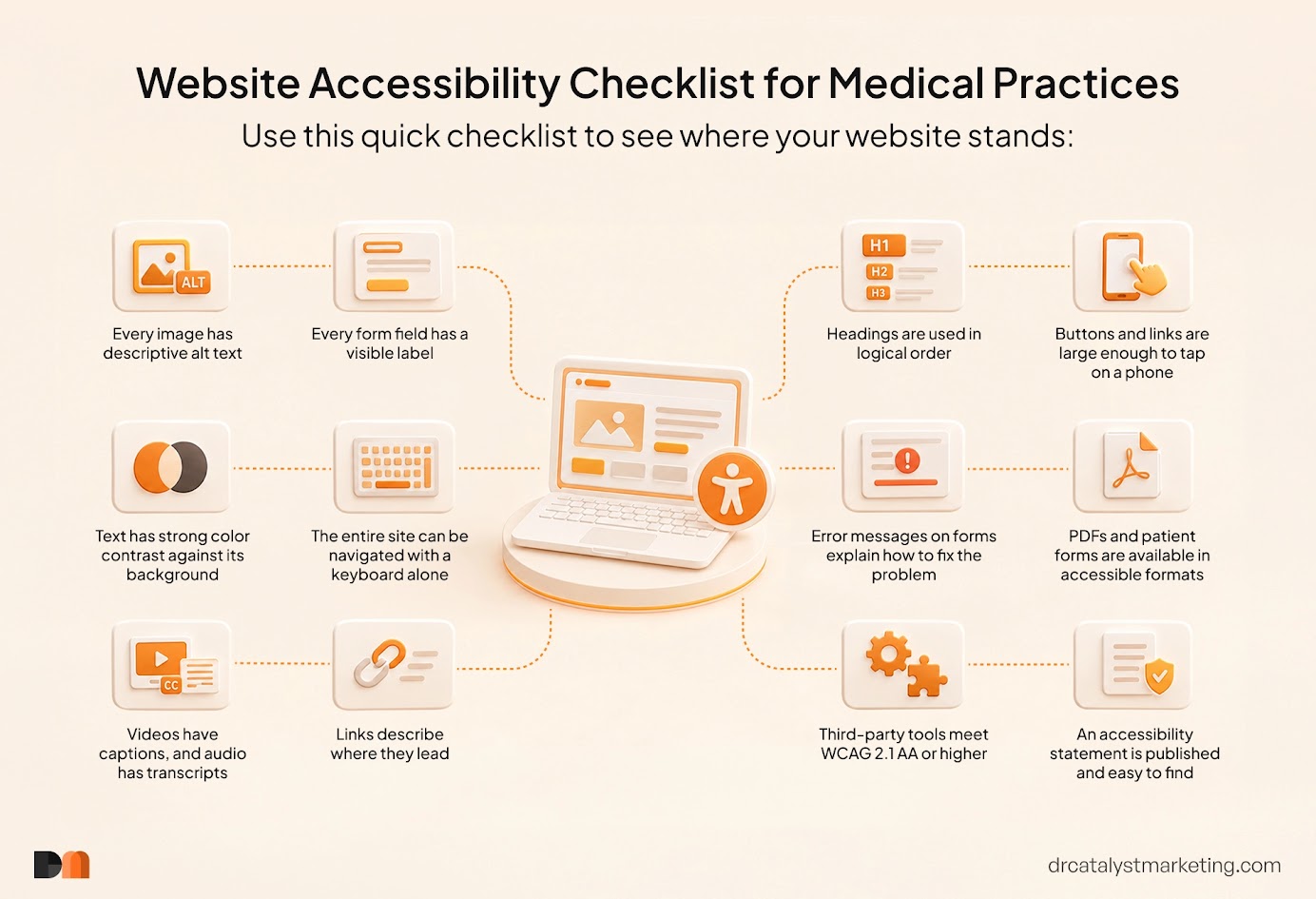
Healthcare website accessibility comes down to small design choices. Images need text descriptions that screen readers can read aloud. Buttons need to work with a keyboard, not just a mouse. Videos need captions. Text needs enough contrast against its background to be readable. These changes ensure your website is accessible to people with all kinds of needs.
For years, website accessibility sat in a legal gray area. The Americans with Disabilities Act (ADA) was written in 1990, before practice websites existed. It never spelled out what an accessible website looks like. Courts and practices filled the gap themselves, often through lawsuits. That's changing because of how patients use your website today. It's no longer just a digital brochure. Patients book appointments, fill out intake forms, pay bills, read test results, and join telehealth visits online. When one of those tools doesn't work for a patient with a disability, they are blocked from getting care.
Your website is also the center for the online presence of your practice. It's where your ads, search listings, and social posts send people, which our guide to digital marketing for doctors covers in more detail. If the destination doesn't work for every patient, every dollar you spend sending traffic there loses value.
The biggest change comes from the U.S. Department of Health and Human Services (HHS). In 2024, HHS finalized a rule under Section 504 of the Rehabilitation Act that sets clear accessibility requirements for medical websites and mobile apps. It applies to organizations that receive federal financial assistance from HHS, which includes many hospitals, health centers, and physician practices that take Medicaid.
The rule requires websites, mobile apps, patient portals, and other digital content to meet a specific technical standard called WCAG 2.1 Level AA. The next section explains that standard. The original deadline was May 2026. In May 2026, HHS extended the compliance deadlines by one year:
An extra year sounds like a lot, but accessibility work takes time. Your website must be reviewed, fixed, and tested, and every new page you publish afterward must meet the standard too. As our medical SEO timeline explains, meaningful website changes rarely happen overnight. Practices that start in 2027 will be racing the clock.
The rule has a few exceptions, including archived content that hasn't been changed, older PDF documents posted before the deadline, and password-protected documents created for one specific patient. Everything a new patient sees, however, is expected to comply: your homepage, service pages, forms, and booking tools.
Public healthcare organizations have a parallel deadline. The Department of Justice sets web accessibility rules for state and local government entities, including public hospitals, under Title II of the ADA. In April 2026, the DOJ extended those deadlines by one year as well.
WCAG stands for Web Content Accessibility Guidelines. It's the international standard for accessible websites, and courts, regulators, and web developers use it to judge whether a site is accessible.
WCAG is built around four simple ideas. A website should be:
The HHS rule requires WCAG 2.1 Level AA. WCAG 2.2 is the newest version, published in 2023. It builds on 2.1 and adds a few protections that matter for patient-facing websites:
Building to WCAG 2.2 means you meet the current requirement and stay ahead of where the standard is heading.
Most accessibility problems build up as a website grows. These are the issues we see most often on practice websites:
Here's what often gets lost in the conversation about rules: accessible websites are better websites for everyone.
Captions help the patient reading your website in a quiet waiting room. Clear headings help the busy parent who scans instead of reads. Larger buttons help anyone booking on a phone with one hand. Plain language, around a sixth- to eighth-grade reading level, helps patients who are anxious, unwell, or reading in their second language.
Accessibility also shapes how patients talk about you. A patient who can't book online, can't read your forms, or has to call three times to get help is more likely to leave frustrated, and sometimes to say so publicly. As our online reputation management guide explains, your reputation is built at every point of contact, and your website is often the first one.
You don't need to rebuild your website to make progress. Most practices get the best results by working through it in stages:
A word of caution about accessibility "overlays": the plug-in widgets that promise instant compliance with one line of code. They can add helpful features, but they don't fix the underlying problems in your website's code. Treat them as an extra, not a solution.
Your website probably includes tools you didn't build: an online scheduling widget, a patient portal, a payment processor, a telehealth platform, or a chat tool. Patients don't know or care who made them. To a patient, it's all your website.
Under the HHS rule, a practice can't hand off its healthcare accessibility compliance to its vendors. If a tool you use to deliver care or services isn't accessible, your practice may still be responsible. Before you sign a contract with any patient-facing technology vendor, ask for its accessibility documentation, often called a VPAT or accessibility conformance report, and confirm that it meets WCAG 2.1 AA or higher.
These terms are often used as if they mean the same thing, but they don't.
Accessibility is the goal: a website everyone can use. Compliance is meeting the specific legal requirements that apply to your practice. Which laws apply depends on who you are:
Many practices fall into more than one category. That's why ADA compliance for medical websites is best treated as a baseline. The practices in the strongest position build to WCAG 2.1 AA or higher, whichever law applies to them.
Disclaimer: This article is for general information and isn't legal advice. Talk with your legal counsel to confirm which requirements apply to your practice.
The deadlines may feel far away, but there are three good reasons not to wait.
First, legal risk doesn't wait for deadlines. Private practices can face ADA website complaints today, whether or not the HHS rule applies.
Second, accessibility work supports your search visibility. Many accessibility fixes, like clear headings, descriptive links, fast-loading pages, and text descriptions of images, are the same things that help search engines understand your website. When you're choosing the right SEO partner, ask how they handle accessibility. The two should go hand in hand.
Third, every month your website stays inaccessible is a month of patients you'll never know you lost.
For 12 years, DrCatalyst Marketing has helped practices across 40+ specialties reach patients who choose them and book an appointment. This has helped numerous practices, such as pediatrics, fertility, allergy, dermatology, and more. We build custom websites aligned with the dedicated care the clinic provides to patients. We also help practices write every page and get it reviewed by a medical representative from the clinic who understands healthcare. We treat medical website accessibility as part of good website design.
We'll look at your website, your local rankings, your Google Business Profile, and what your top competitors are doing better than you right now. That includes the accessibility gaps that may be quietly turning patients away. Then we'll walk you through what we found and how we'd fix it.
Our clients notice the difference. As John Freiler, founder of Premier Allergy of Texas, put it:
"Their team has strengthened our web marketing, improved our SEO, refreshed our website design, and provided helpful feedback that keeps us moving in the right direction."
And from Dr. Tushar Patel, M.D., of CMC Fresno:
"It's clear that you've grasped exactly what I'm aiming for, and your expertise in SEO and keyword optimization is already making a difference."
We've served 200+ practices nationwide and generated more than 1 million patient leads, and 95% of our clients stay with us. If you want to know where your website stands today, contact our team.
Healthcare website accessibility is about one simple idea: every patient deserves equal access to care, and today that access often starts online. The new HHS rules put a date on that idea for many practices, but the reasons to act go beyond compliance. An accessible website serves more patients, protects your reputation, supports your search visibility, and reduces your legal risk. Start with an audit, fix the pages patients rely on most, and build accessibility into everything you publish from here on. Your patients may never mention it, but they'll feel the difference.
Every specialty has its own patient journey. We know the difference between how someone searches for a fertility clinic and how they find urgent care.